

iPad 3 with More Tapered Edge and an 8 Megapixel Back Camera? - MacRumors
Skip to Content

iPad 3 with More Tapered Edge and an 8 Megapixel Back Camera?

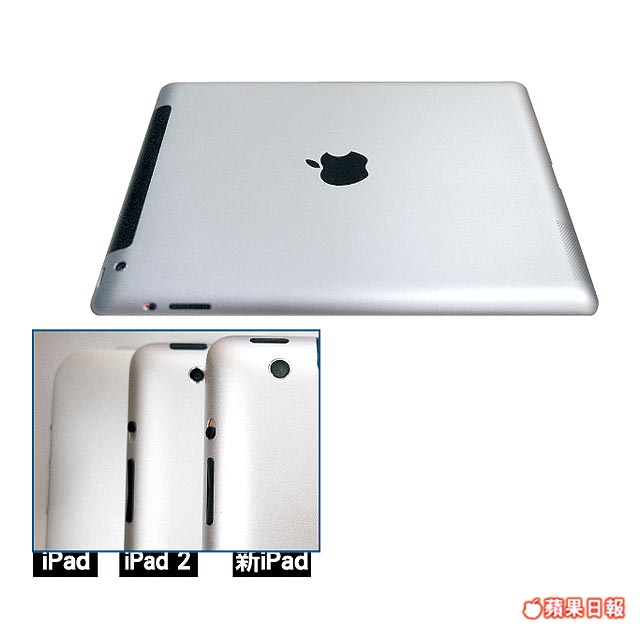
NextMedia / Apple Daily claims to have received the following photos and information through "special channels". The photo below shows what is claimed to be an overview shot of the new iPad 3 back enclosure (top of image) as well as a comparison shot between the original iPad, the iPad 2 and the New iPad (inset). (via Apple.pro)
MN04 024
The shell should look familiar as it seems to be the same part we previously published. The lighting, however, is much better in this shot, and reveals the more subtle changes. There are notably no markings on the back of the case besides the Apple logo, itself.

The iPad 3 enclosure seems to have a more gradual taper to the edges than the iPad 2. The taper is seen better on the top overview photograph. As a result of this longer taper, the iPad 3's camera rests on the taper itself. We saw this before but due to the dark lighting of that image, the taper seemed more exaggerated.

The absolute positioning of the camera doesn't seem that far off from the iPad 2, but the lens does appear larger. According to NextMedia, the new iPad 3 camera will see a significant upgrade to 8 megapixels. The current iPad 2 back camera is 1 megapixel in resolution. The site also summarizes many of the other expectations for the iPad 3, such as an improved display, quad-core CPU, and a March 7th announcement date.

We've seen a rumor from the site only once before. They predicted new MacBooks, MacBook Pros and MacBook Air models back in April 5, 2010. The MacBook Pros (alone) did launch 8 days after that report, though some of the details (hard drive sizes) didn't match up to the report. Overall, the images here seem to match up to other parts that have been floating around China. Apple Daily is described, however, as a "tabloid-style" newspaper, but the Hong Kong edition is said to be quite popular as the second best selling publication.

Related Roundup: iPad
Buyer's Guide: iPad (Don't Buy)
Related Forum: iPad

Popular Stories

8 CarPlay Features in iOS 27 Feature

Which iOS 27 CarPlay Features Actually Work in Your Car?

Thursday September 17, 2026 4:17 am PDT by
In iOS 27, available now, CarPlay gets its biggest update in years, but some features depend on what type of car you have rather than your iPhone model. Some of the biggest additions won't do anything in the vast majority of vehicles on the road today. Here's how the new features pan out. Works in Any CarPlay Vehicle Custom widgets: In iOS 27, CarPlay is no longer limited to Apple's handful ...
iphone 18 pro max prepare

iPhone 18 Pro Max Requires 'Prepare to Ship' Battery Drain Before Shipping

Friday September 18, 2026 4:27 pm PDT by
The iPhone 18 Pro Max has a battery capacity over 20 watt-hours, which means there are additional shipping requirements. If an iPhone 18 Pro Max needs to be shipped somewhere, its maximum battery capacity has to be limited through firmware. According to Apple, the iPhone 18 Pro Max uses an "innovative battery-firmware solution" that limits battery capacity to below 20Wh between when the...
Apple Watch New Charging Puck

Here's Why a New Apple Watch Charging Puck Was Just Released

Wednesday September 16, 2026 8:53 am PDT by
The new Apple Watch Series 12 and Apple Watch Ultra 4 have hardware changes that allow for faster charging, but you will need to use the new version of the Apple Watch Magnetic Fast Charger included in the box in order to achieve this boost. If you need extra ones for your own charging stands or travel or so forth, Apple released the new version of the charger on its online store last week, with...

Top Rated Comments

pewra Avatar
190 months ago
It would be good to take photos on an iPad that aren't quite so grainy.

That said, I did enjoy the flat sides on the iPad 1.

I'll speak for everyone here, shut up and take our money.

Score: 57 Votes (Like | Disagree)
Michael Scrip Avatar
190 months ago
Don't see how they can do a quad-core, retina display, bigger battery and an 8MP camera and still keep the price points the same. I'll believe it when I see it.

Everybody was certain an Apple tablet would start at $1000...

:D
Score: 39 Votes (Like | Disagree)
jayhawk11 Avatar
190 months ago
Don't see how they can do a quad-core, retina display, bigger battery and an 8MP camera and still keep the price points the same. I'll believe it when I see it.
Score: 37 Votes (Like | Disagree)
Michael Scrip Avatar
190 months ago
Still, that Samsung Galaxy Tab 8.9 looks pretty freakin' sweet.

What else does this thing have ?

The screen alone is not a deal closer

- A vibrant app ecosystem
- Silky smooth operation
- Accessories
- Cases

All the stuff that makes an iPad great... now better™
Score: 13 Votes (Like | Disagree)
190 months ago

I really am interested in seeing what resolution the FRONT camera is. If they've managed to sneak in a HD camera like in the new MBPs and iMacs then this will be a great video conferencing machine - especially with a multi-user version of FaceTime.

Me too. I use the iPad for FaceTime a couple times a week. The rear camera? I used it once in the last year just to see if it worked. I would rather they put more work into the front facing camera.
Score: 13 Votes (Like | Disagree)
190 months ago
Theory on why an 8MP camera might be useful

Somebody mentioned that an 8MP camera might be intended for scanning documents. I think he may be onto something. Here's the resolution you get when you shoot something at 8 MP:

300dpi 11.5" (29.3cm) 7.7" (19.5cm) hi-res print

Notice how that is almost perfect for capturing an 8.5x11 sheet of paper at retina display resolution? In other words, you "scan" a sheet of paper into the iPad, and it looks like a perfect reproduction on the retina display of the iPad.

If Apple is pushing for schools to move to electronic textbooks, imagine the iPad 3 also offering the ability for schools (and businesses) to go paperless as well. And on the home screen is a new app called "Scanner", where you hold the iPad above a sheet of paper, and when the app detects a stabilized image of a paper in front of it, it automatically captures the paper, crops it, and begins uploading to iCloud. Boom!
Score: 12 Votes (Like | Disagree)














